MSC: Reserve Capacity
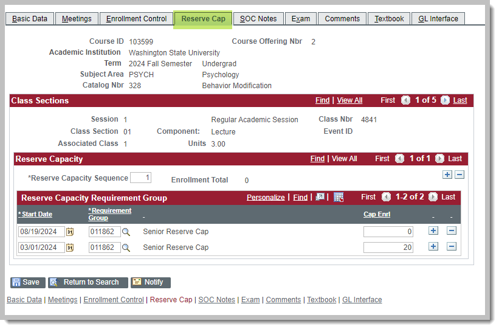
Reserve Capacity is used to reserve seats for certain student populations. Effective Fall 2023, reserve capacities are no longer subject specific. You may use any available reserve capacity.
By Class Standing
011862 - Senior Reserve Cap
011861 - Junior/Senior Reserve Cap
011864 - Sophomore/Jr/Sr Reserve Cap
011517 - First-Year ONLY Reserve Cap (only first year students)
Reserve Capacity field descriptions
The Enrollment Total field displays how many of the reserved seats have been utilized.

Date to begin reserving seats.

Typical dates start prior to registration.
Typically a second row is added to remove the limit prior to instruction, allowing other students to fill the class.
Example dates might be adding a reserve capacity for Seniors the month before registration starts (to allow for NCO), then removing it the week before classes start. Removing the Reserve Capacity allows students on the Waitlist to enroll.
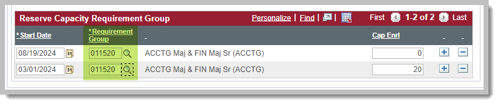
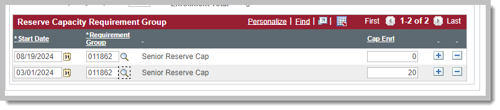
The Requirement Group number field lists the requirement group number. The magnifying glass will list all available pre-requisites and reserve capacities. You may use any reserve capacity. If you have a question about what a specific reserve capacity does, contact Pullman Registrar's Office.


By Class Standing
-
011862 - Senior Reserve Cap
-
011861 - Junior/Senior Reserve Cap
-
011864 - Sophomore/Jr/Sr Reserve Cap
-
011517 - First-Year ONLY Reserve Cap (only first year students)
Find Reserve Capacities
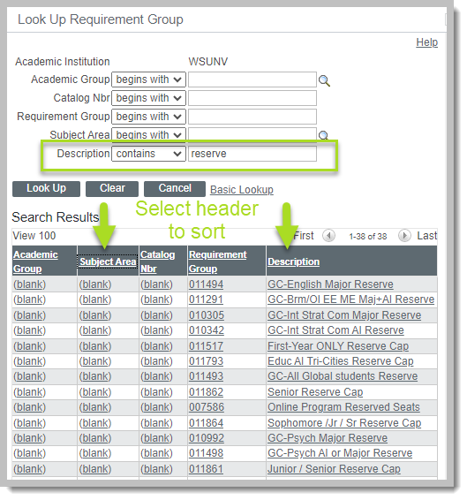
Select the magnifying glass. Update the Description search to "contains" and search "Reserve". Select the header to sort by Subject Area or Description. Some reserve capacities were designed for a specific subject, for example the academic interest or major reserve capacities. All reserve capacities can be used for any subject.
The Capacity Enrollment field sets the number of seats being reserved for that Requirement Group.

Reserve Capacity Queries
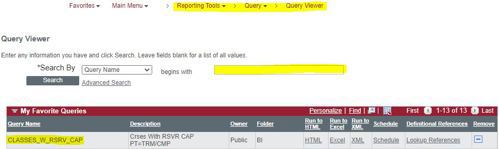
Navigation in myWSU: Reporting Tools > Query > Query Viewer.
CLASSES_W_RSRV_CAP
CLASSES_W_RSRV_CAP_2
EIT_RO_RSRV_CAP