Coding a VC Section in myWSU
Videoconference sections are coded in Maintain Schedule of Classes > Basic Data tab. Fields to update: Location, Instruction Mode, and Class Attribute. Department Schedulers create class sections in Maintain Schedule of Classes within myWSU.
Location
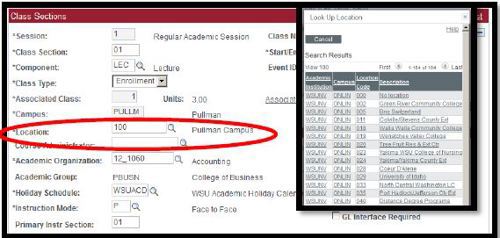
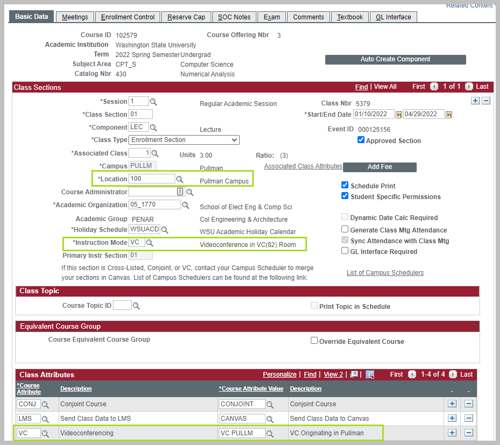
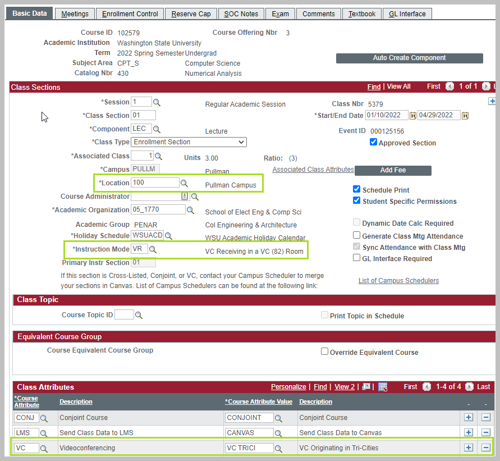
Code location based on where the students will attend the class. When the students will attend from multiple locations, use the location code 999. The example below shows a section delivered at the Pullman campus (100).
Instruction Mode
Updated 11/8/21. There are four new Videoconference instruction mode codes, two for originating sections (VC and VO) and two for receiving sections (VR and VS).
Originating Sections
There are two VC instruction mode codes for the originating section.
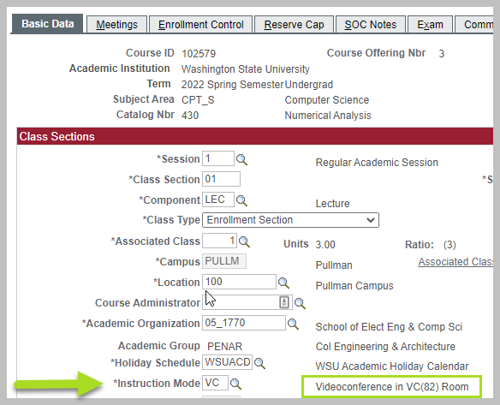
VC - Videoconference. The instructor is teaching from a VC (82) classroom with students in the room.
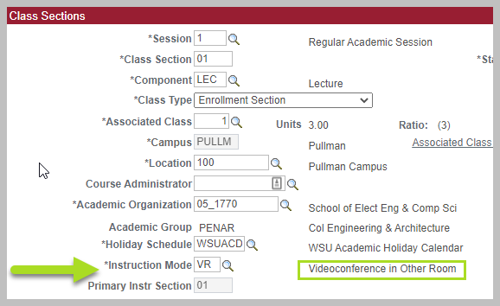
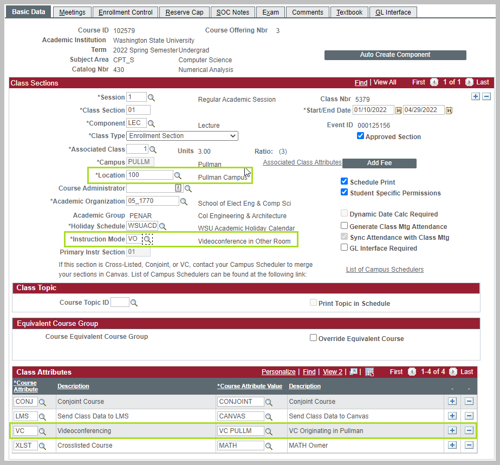
VO - Videoconference Other Room. The instructor is teaching from a non-VC (82) classroom with students in the room. This could be a department room. PIAT does not prove technical support for this instruction mode.

Receiving Sections
There are two VC instruction mode codes for receiving sections.
VR - Videoconference Receiving. The students are receiving instruction in a VC (82) classroom.
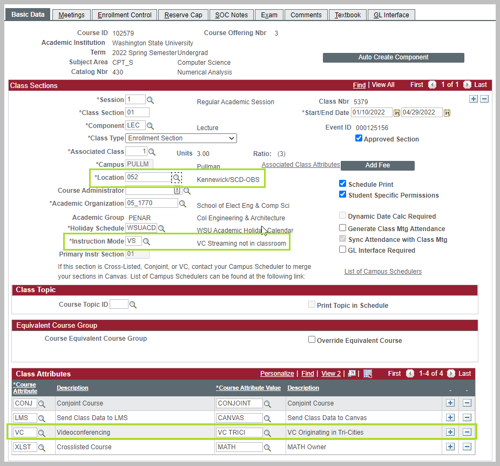
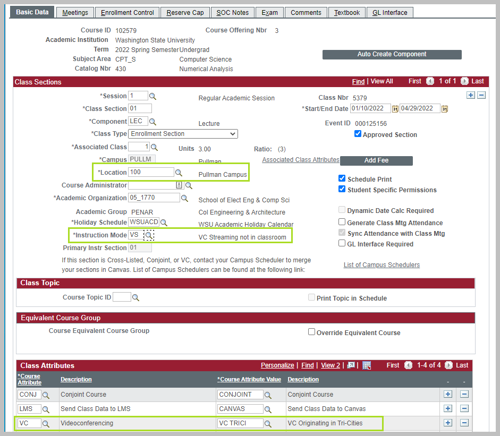
VS - Videoconference Streaming. The students are receiving instruction in a non-VC (82) classroom or non-classroom environment and are able to interact with the instructor. Instruction may be in a department room or on a student's personal device. PIAT does not provide technical support for this instruction mode.

Class Attributes
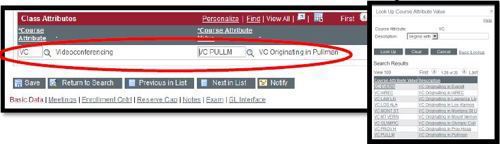
Global Campus uses the Class Attribute to set up Zoom connections between courses. This attribute is added to all sections and is always set to the Originating campus. The example below shows a section that is originating in Pullman, though it could be a section that is either receiving or originating or instructor only. PIAN provides support to GUC rooms only.
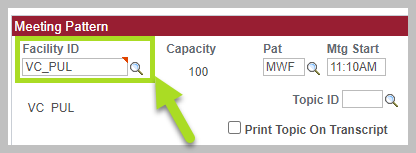
Request a VC capable room in Maintain Schedule of Classes > Meeting tab
Facility ID
Facility ID: Add the VC room placeholder by campus:
Pullman: VC_PUL
Everett: VC_EVE
Spokane: VC_SPK
Tri-Cities: VC_TRI
Vancouver: VC_VAN
Arranged: VC_ARR (used for Extension sites)
Room Characteristic
Room Characteristic: 82 Tech: VC (82) Optimized
Videoconference approved GUC spaces are very limited. The Registrar's Office cannot guarantee that every request for VC_PUL can be honored with a VC space; another room will be scheduled, if available. In these instances, the department is responsible for providing the needed IT support to provide a positive student experience. PIAT does not provide VC support for sections scheduled in non-VC spaces.
Example Sections
VC Originating section - VC (82) Room
VC class originating in Pullman and taught from a VC (82) Classroom.
VC Originating section: Non-VC Room
VC section originating in Pullman and taught from a non-VC (82) Classroom.
VC Receiving section: VC (82) Room
VC section originating on the the Tri-Cities campus and received on the Pullman campus.
VC Receiving section: Non-VC Room
VC section originating on the Tri-Cities campus and received in a conference room on the Pullman campus.
VC Receiving: Off-Campus Section
VC section originating on the Tri-Cities campus and received in Kennewick.