SOC Notes
SOC Notes are additional notes added to course information in the Schedule of Classes. Departments can edit SOC Notes in Maintain Schedule of Classes > SOC Notes tab. SOC Notes may be updated at anytime.
Do NOT use double quotes (") in this field! Double quotes are used to separate data in the myWSU export and will cause the RONet Schedule of Classes to crash during the hourly import. Single quotes ( ' ) may be used instead.
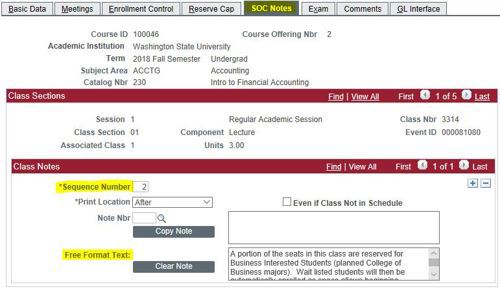
Sequence numbers 1 and 2 work in RONet's SOC and myWSU. Other sequence numbers work in myWSU but are not visible in the RONet SOC.
Sequence Number 1: Required to display URLs.
Sequence Number 2: Required to display text.
Enter a note in the Free Format Text field manually, or select a pre-written note using the Note Nbr field. Add more information to the field to combine notes.
Do NOT use double quotes (") in this field! Double quotes are used to separate data in the myWSU export and will cause the RONet Schedule of Classes to crash during the hourly import. Single quotes ( ' ) may be used instead.
URLs display as a "More Information" link on the RONet Schedule of Classes.
Use html to improve readability and format text in RONet's SOC. HTML does not work in myWSU and will display as written there.
<br> inserts a line break
<br><br> inserts a line space
<strong></strong> bolds the enclosed text
<em></em> italicizes the enclosed text
Use the magnifying glass to see a list of pre-written SOC Notes or view our list of available notes. Enter the desired note number then "tab" or "enter" to populate the Copy Note field with the note.
Use Copy Note to move the pre-written note into the Free Format field. This will overwrite an existing note in the Free Format text area.
Copy the content (Cntrl+C) and paste it into the Free Format Text field (Cntrl+P) when other content is still needed. Use html <br> to create a line break.
The note is not visible unless it is in the Free Format Text field.
Copy Note will erase any content currently in the field.

SOC Notes should be added when additional information will be helpful to a student or provide a more transparent enrollment experience, such as:
Instruction modality needs more explanation
Reserve capacity is in use
Class will meet in a space that is not in myWSU
A special topic title is desired and the course is not a topics class
Available SOC Notes
If you would like a new standard SOC Note created, contact the Pullman Campus Scheduler.
Example Notes
Blended Course
Seq 1: http://apps.aoi.wsu.edu/coursemoreinfo/course_more_info.aspx?uid=2187-12345. Displays as More Information.
Seq 2: This section is a web-based section and does not meet in a regular classroom.

Business Class
Seq 2: A portion of the seats in this class are reserved for Business Interested Students (planned College of Business majors). Wait listed students will then be automatically enrolled as space allows beginning 8/22/2022.